Spaces
Space is the new name for the board.
Welcome to the KanBo 3.0 release!
KanBo licenses having this feature:

In this article:
Overview
Space is one of the basic elements of the KanBo hierarchy.
Spaces are collections of cards arranged in a highly customized way. They provide a visual representation of workflow and allow users to manage and track tasks. They typically represent projects, teams, or specific areas of focus.
Using space views you can present the same cards arranged in different ways, depending on what you need at the time. For example, cards can be displayed on a chart, a list, a calendar, or a mind map. Learn about the space structure to understand how to navigate the space.
Watch this short video to learn the basics of working with spaces.
Go to KanBo Learn Portal for more videos and tutorials.
How to use spaces?
Space is a product, project, resource, or organizational structure that is constantly evolving. It can represent anything and have a variety of uses.
How to start?
- Create the space.
- Divide the work into tasks and create cards for them.
- Customize card statuses.
- Describe cards using available card elements.
- Use space views to visualize the work stages.
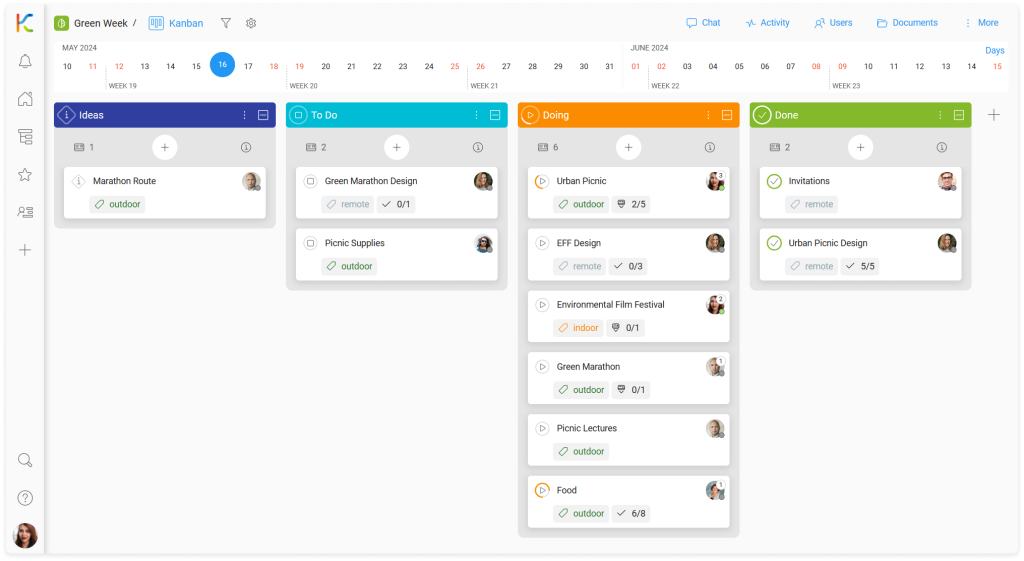

The Kanban view is the basic way of organizing work. It focuses on grouping cards (tasks) according to predefined criteria such as priority, completion status, and responsible person.

However, spaces give you the ability to visualize work in a variety of ways, and the Kanban view is just one of them. Recognizing the differences in the way each department in your company works and the individual preferences of employees, we have created more space views for your projects.

All spaces you have access to are listed with their workspace in the Workspaces & Spaces section. Use the space search to quickly find the space you need.

Example: Space search in the Workspaces & Spaces section.
Collaborate with others using spaces
Once you create the space, let others see it, help with specific tasks, and give feedback.
- Invite other users to the space.
- Engage space users by assigning them cards.
- Use mentions in comments and chat messages to communicate.
Your personal space – MySpace
What if you need to work on many complex projects at the same time?
Use MySpace to collect cards from other spaces and visualize your personal work stream. Learn how to manage MySpace.